
Features of a custom booking engine for Beds24
Everything works together in one place. Guests book directly on the hotel website, while Beds24 continues to manage prices, availability, bookings, and confirmation emails. We integrate with Beds24 rather than replace it. Your existing Beds24 setup stays at the center of the process.
On the hotel website
The hotel places a button, a booking strip, or a booking calendar. The room list and the payment open over the page, in the booking engine.
- 01
Any website, with HTML
The hotel pastes a short piece of HTML on the page. It works on any site that can hold that code, not only WordPress.
- 02
Booking button
A Book or Check availability button opens the booking engine. Dates already chosen on the page come with the guest.
- 03
Booking strip
Check-in, check-out, adults, and children . The calendar shows the hotel’s rules before the search.
- 04
Booking calendar
A calendar showing restrictions and clear pricing. Confirming the dates opens the booking engine.
- 05
WordPress
A plugin for the booking engine on WordPress website: Elementor, Divi, Gutenberg, other builders, and an optional Book now item in the menu.
- 06
Wix
On Wix the code goes in Custom Code, in the page body. Not inside an HTML frame, so the booking engine opens over the site.
- 07
Look of the hotel
Change Colour, background, corners, type, and logo for your booking engine, on the button, the booking strip, the booking calendar, and the booking screen.
- 08
Which sites may show it
The hotel can name the websites allowed to place this booking engine. Other sites then cannot embed it.
- 09
A modern booking screen
Rooms, prices, and the stay are shown as clear cards, with room to read on mobile and on a large screen.
- 10
Built for a phone
The booking button, the booking strip, the booking calendar, and the booking screen are laid out for a mobile first. A date that cannot be chosen is explained with a tap.
- 11
Back to the website
After the stay is booked, Back to the website closes the booking engine.
One property or several
Each property can have its own booking engine. A group can also share one search, across the properties the hotel includes.
- 01
One property
One property, one website, one booking engine. Several properties can each have their own.
- 02
Several properties, one search
One search across all your properties . Choose between properties and rooms. You can show all your rooms with the property name room name and address.
- 03
More than one stay
The guest can keep several stays, with different dates, even in different cities. Changing the search dates does not empty that list.
- 04
Language and currency
The languages the guest can use, and the currency of the charge, are the ones the hotel turned on in Beds24. The guest pays in that currency.
Dates a guest can book
The calendar shows why a date cannot be used. It follows the hotel’s rules in Beds24.
- 01
Restrictions on the day
Minimum stay, maximum stay, no check-in, no check-out, and closed dates are visible, with a legend. On a mobile, a tap explains a date that cannot be chosen.
- 02
Changeover days
A day can be check-out in the morning and check-in in the afternoon. That day is not showing as fully closed.
- 03
Same-day arrival
Same-day check-in stops at the hour the hotel set in Beds24, on the hotel’s clock, not the guest’s.
- 04
When the season is closed
If the coming months have no check-in, the calendar opens on the next date a room can be booked.
- 05
Other rooms and other dates
If those dates are not free, the guest sees other rooms for the same dates, and nearby dates that work.
- 06
Messages when nothing is free
The message can follow what you have set in Beds24, or the hotel can set its own messages for this booking engine, in each language.
Rooms, prices, and extras
What the guest sees after the dates are chosen.
- 01
Room card
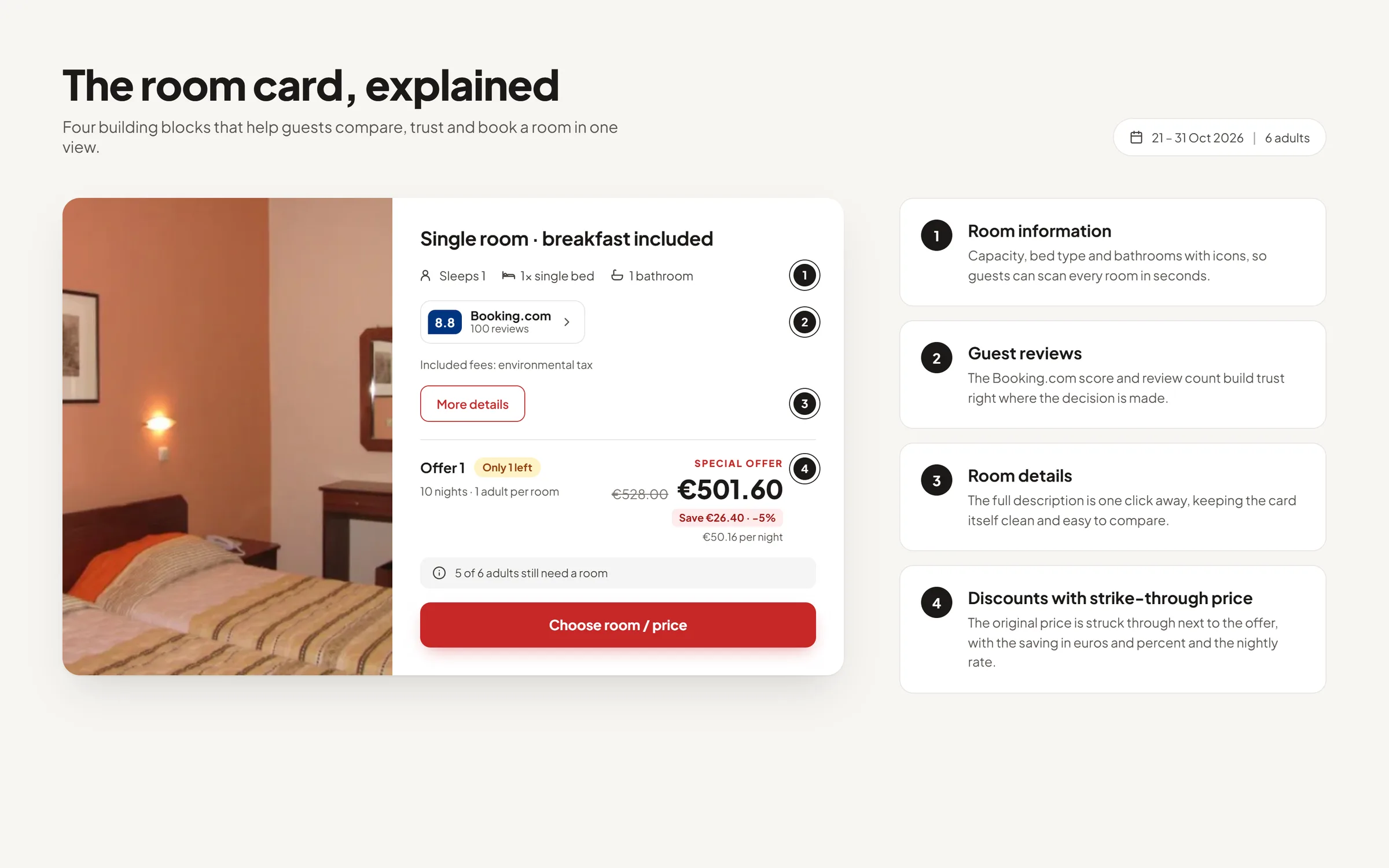
Photos, name, Guests capacity, size, bedrooms, bed types, and bathrooms (set in our Dashboard).
- 02
Description and photos
More details opens a popup window on that room showing: the description, and the photos.
- 03
Offers
Offers stay in Beds24: the usual rate, flexible, non-refundable, packages. The guest picks one.
- 04
Special offer on a longer stay
You can offer discounts for longer stays in several ways: apply a percentage discount to the entire stay, reduce the price of each night starting from a specific night, apply a one-time fixed discount, or set a maximum room price.
Guests will see the Special offer price, with the original room price crossed out so the discount is clearly visible.
Extras are not affected by these discounts and keep their original prices. Beds24 offers and voucher codes continue to be managed directly in Beds24.
- 05
Upsells from Beds24
The upsells you set in Beds24 are displayed in the hotel’s defined order, including any fees that are added automatically.
You can also create custom extras with your own pricing calculations and apply them only to a specific date range.
- 06
Voucher codes
The guests can use the voucher codes you have created in Beds24.
- 07
Guest reviews
Booking.com and Airbnb reviews can be displayed optionally on each room card. Guests can open the full review details in a popup without leaving the booking flow.
- 08
Room amenities
The hotel ticks features on each room in Beds24. Those can show in More details, with plain names, only after the hotel turns that on for the booking engine. Off until then.
- 09
Order and hidden rooms
Rooms are displayed according to the Sell Priority set in Beds24. Any room or property marked as hidden is excluded from the booking engine, even if it remains available for sale on other channels.
- 10
Guests
The maximum number of guests, adults, and children allowed for each room is taken directly from Beds24.
- 11
Children Ages and Prices
Define different child age groups and set a price for each age range.
Any additional child charge will be added to the booking in Beds24 under Charges & Payments. An Info Code will also be added to the booking with the relevant child age and pricing details.
Guest details and house rules
The form follows the questions the hotel set in Beds24.
- 01
Booking Questions
The booking engine uses the standard guest questions and up to ten custom questions already configured in Beds24. You can choose which questions are shown to guests, while any fields marked as required in Beds24 remain mandatory. First name and last name are always included.
- 02
Policies before booking
Guests can open and accept the general policy before submitting the booking or making a payment. The privacy policy is shown only when the hotel has added a link to it. The cancellation policy is displayed whenever cancellation text is available in Beds24.
- 03
Confirmation email
Confirmation, request, and cancellation emails are sent using the hotel’s own Beds24 templates. We do not send a separate second email.
The required emails should be configured in Beds24 using Auto Actions. The booking contains Infocodes and Referer that can be used to send Auto Actions automatically.
How the guest pays
The booking engine uses the Stripe account connected in your Beds24 dashboard. Payments are processed directly through your own Stripe setup—we do not receive or handle any guest payments.
- 01
Deposits
The booking engine uses the Deposit settings already configured in Beds24 for both Normal Bookings and Near Term Bookings. These rules remain in Beds24 and are not replaced by the booking engine.
- 02
Offline Bookings
You can also accept offline bookings. The booking is sent to Beds24 either as a request or as confirmed, depending on the hotel’s settings. Payment is then collected by the hotel separately.
Dashboard
The dashboard is multilingual.
- 01
Photos and room facts
The hotel can import or upload room photos and define bedrooms, bed types, and bathrooms. Room size is taken from Beds24 when available. Room quantity and maximum guest occupancy continue to be managed in Beds24.
- 02
One-time setup
When the hotel wants us to set up the account, that is a one-time fee on our invoice. It is not the monthly subscription, and it is not charged again. Guest payments stay with the hotel.
- 03
Help and support
Help and support are built into the setup process. Hotels get step-by-step guidance, illustrated help articles, and can open a support ticket whenever they need assistance from us.
What this product is
A custom booking engine built for hotels that already use Beds24. It connects to the hotel’s existing Beds24 setup for availability, prices, restrictions, bookings, payments, and guest communication.
- 01
It works with Beds24
The booking engine integrates directly with Beds24. Inventory, prices, availability, and booking records remain managed in Beds24.
- 02
An alternative to the standard Beds24 booking page
This is an alternative to the standard Beds24 booking page. It does not replace Beds24—the hotel continues to use Beds24 for its core setup, inventory, prices, and bookings.
- 03
On the hotel’s own website
Guests stay on the hotel website throughout the booking process. The booking engine does not load the standard Beds24 booking page in an iframe and does not redirect guests to a Beds24 URL.
Instead, it opens directly over the hotel website and, when closed, returns the guest to the same page.